sunnuntai 4. joulukuuta 2016

One step closer to OnePlus

First I'd like to apologize that took roughly a month to share my first thoughts with my brand new Android purchase among my readers. Unfortunately my Nexus 5 started to point out its lack of modern performance. In other words despite of proceeding full wipe and installing decent ROM for daily use, Hammerhead decided to be occasionally slow, laggy so to speak. Only method to gain and maintain decent performance was to perform moderate CPU overclock which actually worked as aimed. On the downside got even worse battery duration and slightly warm feeling in my gut, so to speak.

Next thing I had to admit myself that it was time to move on. After long consideration, I ended up with totally new branch of Android, at least to me. Purpose was to reach mid range Android mobile with latest possible technology and premium look. After a deep look to web, weighting pros and cons between various phones, OnePlus 3 promises the most, at least on the paper.

Now I've been using OP3 around a month and so far it's been promising. Not only having decent features, rooting and installing 3rd party operating systems won't harm official warranty - itself is more than could ever hope.

In spite of no cons toward mobile itself, unfortunately availability of gadgets here in Finland is currently very limited. Only one retailer sells OnePlus 3 and their available accessories are very limited. During day of purchase got only official glass screen protector - nothing else. After looking for decent rear cover from domestic markets, had 
to order Spigen from UK. Bright side was that price and estimated shipping time was acceptable.

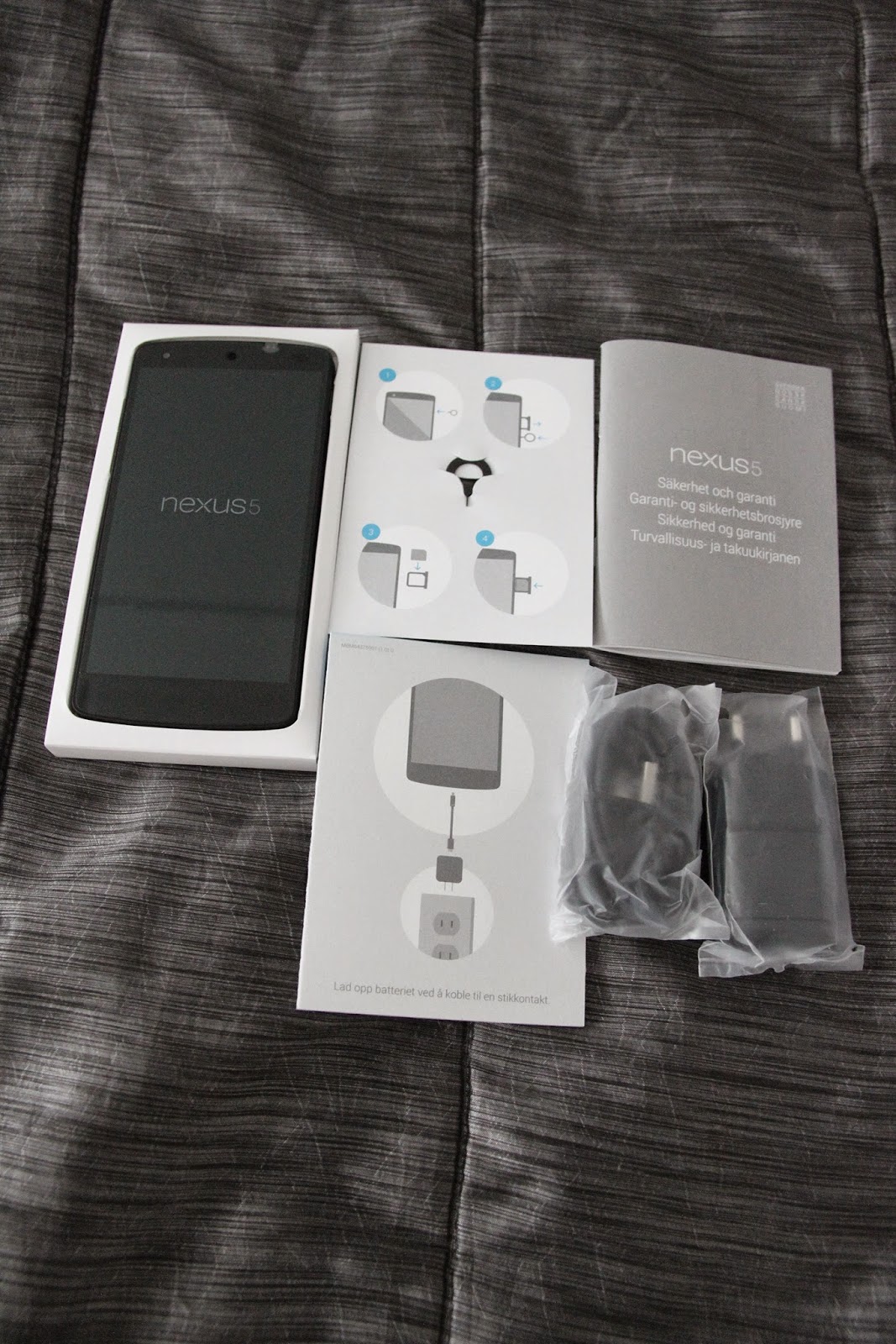
I'm writing this post actually with my OP3 so unboxing photos later on. So it goes a bit backwards but this time here's photo of rear cover accessory I decided to give it a shot.


tiistai 29. syyskuuta 2015

Era of new genuine battery replacement

Hi folks,

during past month my it appeared that my phone's battery seems to be reaching its final destination. First decided to clear out possibility that it enormous battery drain wouldn't be software issue. After clearing that out, it was time to seek new battery replacement, preferably genuine product.

After reading some comments and recommendations, decided to order new battery from eBay. Shipment arrived approximately week and half from order date. Package included only battery for non-retail purposes and no installation tools. I was aware lack of tools since already had required ones when got new battery for my wife's iPhone 5. Day after arrival decided to replace phone's current battery with brand new one. Process took roughly 20 minutes and with help of iFixit instructions, entire process was averagely easy to proceed. If I have to point out any possible challenge(s), battery was connected to phone's body with adhesive and to be honest, it required a bit of gentle prying to be able to remove current battery. Also when removing back cover, freeing some of the clips was a bit tacky but luckily was able to free all of those without causing major damage to back cover including fragile clips. Unfortunately one clip was partly damaged but I was able to clue it back together before installing cover back to phone.

Here's some photos I took during battery replacement process, mainly as purpose to describe how process looks instead of giving step by step instructions how to complete the process. Whoever I suggest to follow precisely instructions provided by iFixit.


torstai 6. elokuuta 2015

Worthiness of rooting

Ahoy mateys,

since it's again more than a month from previous post, finally I decided to give a try to share some new thoughts among my readers.

Despite of Nexus 5 being Vanilla Goddess, I decided to root my Hammerhead and install both custom recovery and custom ROM. Decided to go with super lazy method via using toolkit to perform needed procedures. Wug's Nexus Root Toolkit gave more than enough to satisfy my current needs, so to speak. Toolkit also allows to unlock bootloader, nonetheless did that a while ago manually through CMD Prompt.

In nutshell entire process went following: NAND backup, full wipe and then custom recovery. After phone booted successfully to TWRP, it was time to install custom ROM. My first ROM to my Hammerhead was Cataclysm since wanted to try first stock based custom ROM instead of AOSP/AOKP. After testing Cataclysm more or less a week, decided to try out custom kernel as well. Currently using ElementalX kernel providing smooth performance and battery durability combination. The perfect companion for ElementalX kernel is EX Kernel Manager by giving total control over device. Totally worth of 3,5 EUR if you want to tweak kernel's settings manually instead of using kernel's stock adjustments.

maanantai 25. toukokuuta 2015

Spigen Nexus 5 Case Ultra Fit

Hi again folks,

since had some minor cracks in my body's frame, I decided to order new case for my device. When doing some research, my priorities were basically black colored lightweight version with premium quality. After comparing various products, I finally ended up to Spigen's Nexus 5 Case Ultra Fit which I ordered directly from Spigen's online store.

Before deciding from which store I'd order Spigen's case, I ended up to Spigen's own online store for following reasons: guarantying genuine product (compared to fake alternatives from eBay or Amazon) and decent price shipping included.

Since product's price without shipping expenses would be below 22 EUR (approx 25 USD), shipment from non-EU location wouldn't land to customs here in Finland, I decided to order case from US.

Shipment confirmation included shipment tracking number, so I was able to follow my shipment via USPS tracking service which was relatively accurate even though it didn't notify me when shipment landed to airport in Finland.

Shipping duration was approx 7 days, didn't that much calculate more accurate duration.

Total cost was approx 18.5 EUR (21 USD).


Here's some unboxing photos from Spigen's case I'm currently using in my device.


Android 5.1.1 LMY48B improves battery durability

Hola folks,

as you might have noticed, Google has released new fw version for Hammerhead also known as Nexus 5. Latest release goes with 5.1.1 LMY48B build version and it's possible to download from Google Developers site under the title Factory Images for Nexus Devices. After a bit scrolling, it's possible to find device called "hammerhead" for Nexus 5 (GSM/LTE).

There's also brief factory image installation instructions on that specific site but in case you've noticed, my previous post provides alternative source for those instructions.

Quick sights from latest release

After a couple of days usage, I'd notice significant improvement compared to previous release 5.1 LMY47D. With latest version runtime more than 24 hours, free RAM has settled to approx 1.1GB which is 10-15% improvement from previous version when measuring my personal use.

Some remarks from battery usage

Here's average battery durability from 3 charges' average value. Battery lasted 25-30 hours with roughly 3 hour SOT (Screen On Time). And about my daily use in general, each email's push in every 15 minutes and all social media apps' has active push meaning when new message arrives to Facebook, phone let's me know it asap. Also some web browsing and Facebook basically every freaking day without forgetting minor video streaming from Youtube.

torstai 12. maaliskuuta 2015

It's time for Lollipop 5.1

Hi folks,

as unfortunate it is, I'vent been active lately in this olive branch. Since now I've more suitable moment and something actual to discuss, let's start with Google's latest OS announcement.

Google has released new Lollipop 5.1 release with huge promises. Catch up content of unwrapping from Android's official blog,


Since Lollipop 5.1 update was just released, I should wait OTA announcement for my N5 some days, maybe even a week. Therefore I was a bit impatient, to be honest more than a bit. Therefore finally decided to give a shot to install manually Google's official OS image. As I've been keen on XDA Developers community, decided to search instructions and some tips to complete manual OS image installation as smooth as possible. Especially this process need to be taken care of very accurate since even soft bricking my only mobile phone would be extremely crucial since therefore wouldn't have any backup option to use mobile for my daily basis needs.


HOW TO MANUALLY INSTALL OFFICIAL OS FOR NEXUS 5

To share my succeeded process, I'd like to share it among my readers as well. Therefore following part of this post consist of step by step instructions how to complete Google's official OS image installation with Windows OS. Unfortunately I don't have device with Mac OS X operating system, so therefore readers using Apple products have to search help from somewhere else, my humble apologize for that, in matter of speech.


Pre-steps


  1. Download and install USB and ADB drivers, click here
  2. Download factory image you want to install, click here
  3. Unlock bootloader manually via CMD prompt or automatically with suitable toolkit
    NB! Wipes all data from your device, remember to take backup if needed

Actual procedure
Step by step instructions provided by abaaaabbbb63 (recognized contributor at XDA Developers)

Method 1 

OR

Method 2


PERSONAL THOUGHTS

All required steps in entire process was pretty much clear to me as long is able to be enough patient and focused. Method 1 gave my error message while executing flash-all.bat. Whoever decided to give a try for method 2 which gave clear results. As a final closure for this particular post, here's screenshot proving device info of my N5.


maanantai 19. toukokuuta 2014

Deving my old warhorse

Hey folks,

probably too much time instead of concentrating to spring semester's finals since decided to locate my old warhorse - also known as Galaxy S3 Int (i9300), erase it totally and try out latest KitKat SlimKat stable. Erased all current scraps with superwipe script, updated my current custom recovery to latest CWM PhilZ touch recovery, installed latest SlimKat (known as SlimRoms) without forgetting latest minimal gapps.

Slim of approval

At least after some testing, latest stable version of SlimKat seems to be well functioning, at least from the first glance. Ofc it requires much more testing to approve if that custom ROM is honestly ready for daily use. Will see - depending how long I'm able to maintain my interest to this specific matter. Stay tuned!

keskiviikko 2. huhtikuuta 2014

Sneak peak for new revealing

Hola folks,

it's been quite a while from the last post so it's time for totally new reveal - which this time means unboxing photos of my latest purchase.


Ps. next post would be something more informative.

perjantai 8. marraskuuta 2013

Android 4.3 Jelly Bean update now rolling out for Samsung Galaxy S III

Great news for Galaxy S3 (i9300, Int version) owners,

according to Sammobile, Samsung has started rolling out official Android 4.3 Jelly Bean update for Samsung Galaxy S3 International version (i9300), which probably every S3 owner has been waiting more and less patiently a couple of months already.

According to earlier mentioned article, changelog for MJ9 is worth of mentioning, in other words here are changes and improvements listed briefly:

  • GALAXY GEAR Support
  • TRIM Support (Makes the device much faster)
  • ANT+ Support
  • Core UI elements updated to the ones on the Galaxy S4 (Galaxy S4′s theme all over)
  • New Samsung Keyboard
  • GPU drivers have been updated (Higher GPU benchmark scores)
  • New Lockscreen: Multiple Widgets, improved ripple effect than Android 4.1.2, ability to change clock size and set a personal message
  • New Screen modes (From S4): Adapt Display and Professional Photo
  • Daydream
  • Driving mode
  • Actionable notifications
  • Move-to-SD-card feature
  • New Camera mode : Sound and Shot
  • New Additions in Notification Centre
  • Completely revamped Settings UI (Tabbed interface – Exactly like the Galaxy S4)
  • Implementation of Voice controls (Let’s you control various parts of the phone using voice commands – Galaxy S4 feature)
  • New Samsung Apps: Calculator, Clock, Contacts, Gallery, Music
  • Full screen Samsung apps
  • New S-Voice (from Galaxy S4)

In my case I'm waiting new build for my favorite custom ROM - Android Revolution HD which is probably more well known as ARHD. According to its developer, new build is coming out soon. Now I've to just wait it patiently due not going to change from ARHD to another custom ROM just because would be already existing new build based on Samsung's latest 4.3 JB update.

In nutshell: I'm going to wait for ARHD's next build, then make fresh install through factory reset and manually install all needed applications and configure all required settings. After that I'll post here some thoughts and personal user experience to share knowledge among my fellow readers.

Stay tuned!

torstai 4. heinäkuuta 2013

Samsung's 4.2.2 XXUFME7 leak through ARHD 32.0

After long consideration (and reading through ARHD's official XDA thread) I decided give a try for latest Samsung's leaked 4.2.2 (XXUFME7) which was base of Android Revolution HD 32.0.

So I did following:
  1. took all necessary backups from internal and external memory (inc. contacts, sms and EFS)
  2. flashed mega wipe tool (by zoot1, xda developer) in recovery
  3. flashed ARHD 32.0 in recovery
    -inside AROMA: wipe, selected GAPPS, no Samsung apps, no tweaks, recommended superuser app
  4. fixed permissions and restarted phone

Conclusions

After a bit more than one week lasting testing it seems to be that latest leak works just fine in daily basis. Haven't found any major (or even minor) bugs or other relevant issues, like FC's, hanging etc. Unfortunately battery duration has decreased when compared to latest official Samsung's build which is 4.1.2 XXEMF1.

Official 4.2 coming ahead

According to several Android interested sites, Samsung would release official 4.2 build for i9300 during July-August 2013 but who knows if it's all about rumors or is there truth behind those releases.

keskiviikko 10. huhtikuuta 2013

Dualboot with newest Siyah kernel

Greetings folks,

there've been a while since my previous post. Whoever there haven't been going on that much during past months. In other words it all about updating ARHD (Android Revolution HD) custom ROM to latest available version.

But turning point appeared since kernel developer gokhanmoral released newest Siyah custom kernel which provided dualboot utility allowing to install two different ROM to mobile. In my case that provided me to use newest Android 4.2.2 and the most stable Sammy 4.1.2 in dual boot. Practically it means that I use newest AOKP custom ROM (Android 4.2.2) on daily basis unless I want to use my camera, I'll boot my phone ARHD custom ROM.

Using dualboot utility is going to be a temporary choice if it's possible to assume that after Samsung release official 4.2.x source, developers in XDA are able to compile even more stable 4.2.x custom ROMs' which would more than enough for everyday use.

Ps. I'll update this post later by providing more information about Siyah custom kernel (inc. explanation of dualboot utility) and quick glance for AOKP custom ROM.

maanantai 28. tammikuuta 2013

Rollback to ARHD

Hola again,

even though I praised newest CM 10.1 Nightly custom ROM more than a lot, after testing for a while, I've discovered a few issues which were bugging me. To be more specific, mainly it was all about "touch to focus issues with enabled flashlight". In real life this means when I use "touch to focus" ability, camera fails to work. According to CM developers this is reason from lack of official source.

Summarum: if I want to return to use CM 10.1 (Android 4.2.1) with my Galaxy S3, I've to wait for Samsung release of 4.2.x base. Currently Samsung reveals new updates quite often, but not yet 4.2. Anyway Samsung hasn't announced anything official about 4.2 release, so only option is to wait patiently.


lauantai 26. tammikuuta 2013

New year means new era - Please welcome Cyanogenmod

Hola folks!

It's been time since last post in my Android deving blog. After clearing my thoughts, I finally decided to give try for Cyanogenmod, to be more specific newest version CM 10.1. That was the best choice in my opinion even though it wasn't so called stable build.

Moving from thoughts to action

So here comes what I really did via step-by-step procedure:

1. Back'd up current ROM (ARHD 19.0) via CWM
2. Downloaded official CM 10.1 Nightly build (build Jan 22nd) and newest Google Apps (known as GAPPS)
3. Booted phone to CWM
4. Did full wipe (wipe data, cache and dalvik cache)
5. Installed first CM 10.1 and then GAPPS
6. Fixed permissions
7. Finally did reboot

Boot went fine, saw fancy CM logo and waited for a while that fresh install completed to desktop.

First thoughts of CM 10.1

After having first glance of the entire view, CM 10.1 looked pretty much same when compared to my previous experience of CM during my earlier HTC deving times. As already pointed out earlier in this blog, my first Android phone was HTC Desire Z which had Mimicry custom ROM (based on CM repo and 4.0.4 base).

I'm more than glad that currently CM dev team has included ROM auto update, which makes updating CM Nightly much more easier. In other words just connect to Wi-Fi, go to settings and search new updates, download possible update and install it. Hitting install basically means that CM boots automatically to CWM, flashes newest update and reboot back to business. I would say that is a nice user-friendly addon because new updates comes every day, that's what Nightly version is all about.

Current thoughts of CM 10.1

Currently running newest CM 10.1 Nightly (cm-10.1-20130125-NIGHTLY-i9300) with CM own kernel. So far I've been satisfied it and haven't been thinking about returning to ARHD even though it's also worth of mention custom ROM based on stock Sammy 4.1.2 (XXEMA1).

Haven't installed any mods or tweaks, only installed custom icon pack to make homescreen more personal based on my interest. Take a look my current view of modified homescreen.


Personally modified homescreen of CM 10.1 Nightly.

lauantai 8. joulukuuta 2012

ZAGG Invisible Shield HD for Samsung Galaxy S3

Two posts during same day seems to be quite extraordinary, whoever it's explained by my flow to provided new thoughts. I hope you got something useful from my previous post about my average battery duration with Android Revolution HD custom ROM.

Now I'm going to entirely different topic, which is protecting mobile by using screen protector. As mentioned in several earlier posts that I've used screen protectors since my very first touch screen smartphone (Nokia N97). Anyway I've used budget priced screen protectors so far, which basically means 2 pcs bundle carrying average 10 EUR price tag.


But today I installed my very first high performance screen protector to try is it worth of its worldwide glory name. As already mentioned in title of this post, that high performance screen protector in my case is called ZAGG Invisible Shield, to be more specific its newer HD version. More information about HD version for Galaxy S3 can be found from official product description by manufacturer's official website. 


About the installation process

Product package included all needed equipment for installation process but also clear step-to-step instructions "how-to install Invisible Shield properly". Anyway I wanted to have video guide for supporting the installation process. I've found out that Youtube provides plenty of useful support videos for many, many different occasions.

After quick searching I found video titled "Zagg Invisible Shield for Samsung Galaxy S3", which provided step by step installation instructions to complete the entire process successfully. For blog readers, here's the video I found useful. Thanks goes to AndroidAuthority community which provided this and other also necessary videos.

Here's two photos; product package and view from completed installation (uploaded later) to give closure to this post.

Price was 24.90 EUR from Finnish retailer.

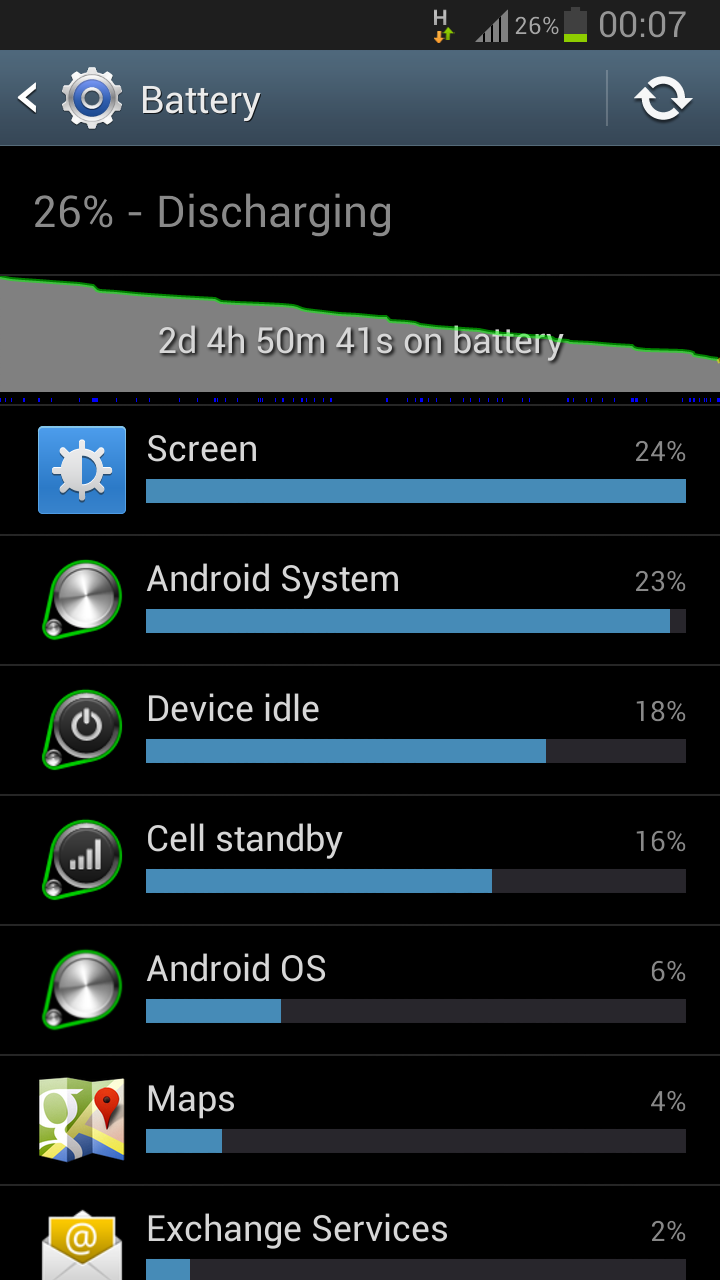
Finally some statistics from average battery duration

Finally I had time to transfer my newest photos and screenshots from my i9300 to PC. I should put this to other words, I had a plenty of time but discovered that more than 50 new photos in my cell, which requires sorting and archiving which in my case takes time as being such a perfectionist.

As a reminder my daily use is following (average work day)
  
  • Email (Exchange)
    •  Exchange auto push during rush hours (7.30-16.00) 
    • In every 1 hour during off-peak hours (16.00-22.00)
    • Disabled during night time (22.00-7.30)
  • Email (Gmail)
    • Automatically in every hour 24/7
  • Browsing
    • Average 15-30 minutes daily
  • Facebook
    • Average 15-30 minutes daily
  • Casual calls and messaging

Following two screenshots describes difference between two newest builds of ARHD

ARHD 15.1
ARHD 16.0

When both screenshots were taken, ARHD custom ROM was running stock kernel and without any possible tweaks provided by ROM's AROMA installer.

torstai 6. joulukuuta 2012

Continuing with ARHD

Haven't been active here lately because my daily work routines keeping me quite busy, yeah I know it ain't excuse. Anyway I'm still on Android Revolution HD custom ROM, which is keeping me pleasant.

Newest version 16.0 is based on leaked Sammy 4.1.2 which whoever is running smoothly. Lately Samsung has released official 4.1.2 (JZO54K) FW, more information can be found from here. Haven't checked yet if there's any differences between leaked and official build, whoever developer of ARHD (mike1986.) is going to re-compile ARHD with new official 4.1.2 Sammy.

Some thoughts about currently newest build of ARHD 16.0

Currently running it with newest Perseus custom kernel (alpha27) and I've found quite balanced setup between performance and battery duration. My GS3 is running smoothly with average 45-50 hours battery duration.

Ps. as I get screenshots transferred from my mobile to PC, I'll add here screenshots to prove better battery stats by showing my average level of use.

It's a bit classy to say but anyway stay tuned!

torstai 8. marraskuuta 2012

So satisfied to ARHD custom ROM

Haven't been so active writing here as trying to prove being kinda HC dev person in Android platform. Probably one reason for being passive lately is that nothing much has happened lately.

In other words it's mainly about updating ARHD (Android Revolution HD) to newer possible version as any updated build becomes available in XDA Developers Forum by developer mike1986. Whoever I'd like to point out few comments about newest version 14.0: in overall level newest JB base (4.1.1 in GS3) is pretty smooth and provides remarkable performance without forgetting reasonable battery performance.

In nutshell my daily use is following:

- Browsing 15-30 minutes
- Internet radio or Spotify 30 minutes (+/- 10 minutes)
- Exchange: auto push during rush hour (between 8am and 3pm) and in every 30 minutes otherwise
- Facebook use varies a lot: sometimes 10-15 minutes, but sometimes even one hour

With earlier mentioned average daily use my stock battery lasts around 45-55 hours which I've found out more than acceptable.

More posts in near future so stay tuned!

keskiviikko 17. lokakuuta 2012

Too tired for waiting official JB - time for custom ROM

As already mentioned in earlier post, I'm tired to wait official JB release in Finland, so finally decided to install custom ROM to my GS3.

First I installed newest CWM Touch recovery via Odin. After booting first time to CWM, I did following steps:

1. Full backup via Nandroid
2. Flash SuperWipe (Android_Revolution_HD_Super_Wipe_Galaxy_S3.zip, can be found from opening post with instructions)
3. Install custom ROM ( install zip from sdcard)
4. Install custom kernel (Perseus for JB)

I decided to try newest Android Revolution HD custom ROM, mainly because it's improved and optimized stock ROM based on JB build. Also I prefer AROMA installer which allows to choose wanted options, tweaks and modifications personally instead of "Install-All" choice. In my previous Android (HTC Desire Z) I used newest Andromadus Mimicry custom ROM which also included AROMA installer.

Ps. next post probably includes thoughts about Android Revolution custom ROM's performance, battery duration and relevant matters. As always said, stay tuned!

lauantai 6. lokakuuta 2012

Giving goodbyes for my first Android

As I've been using Galaxy S3 for around a month now, I decided to sell my first Android cell, which was HTC Desire Z. I'm trying to find possible purchaser in Facebook's local "second hand" community and hoping to get rid of it because it lays in one of my bureaus without no meaningful purpose.

I put 180 euro starting price because I wanted to drop out possible discount beggers. Also even Desire Z is not brand new, it's still in very good condition: purchase date was April 18th 2011, screen had screen protector since first use without forgetting of active use of HTC's official accessorize, leather pouch.

When writing this post, my sale advertisement has been online a bit less than 24 hours and already got one possible purchaser. Now just waiting for real contact to proceed purchase process.

maanantai 17. syyskuuta 2012

Personal consequences of delayed official JB build release

First information about Jelly Bean release date was September, but according to Samsung Denmark, new release date is October or it could still delay to November. Whoever ICS gets still smaller OTA updates.

After rooting Galaxy S3, mobile cannot receive anymore official updates either via OTA or Kies. Still mobile keeps receiving notifications always when new update available. Because there's no "don't remind me" option, it's a bit annoying to manually cancel update announcements.

Only solution for going through issue mentioned above is to un-root Galaxy S3, install newest updates and then re-root mobile again. Process is not complicated, but it has to be done manually which takes around five minutes to complete.

Basically un-root process is simple: only needed step is flash stock ROM via Odin. Again XDA Developers Forum provides easy, step-by-step instructions to complete the process.

Now just hoping that not so many new official updates for ICS (4.0.4) before official JB (4.1.1) release.

Ps. I've to admit again that this phone keeps me satisfied from the purchase date.