lauantai 26. tammikuuta 2013

New year means new era - Please welcome Cyanogenmod

Hola folks!

It's been time since last post in my Android deving blog. After clearing my thoughts, I finally decided to give try for Cyanogenmod, to be more specific newest version CM 10.1. That was the best choice in my opinion even though it wasn't so called stable build.

Moving from thoughts to action

So here comes what I really did via step-by-step procedure:

1. Back'd up current ROM (ARHD 19.0) via CWM
2. Downloaded official CM 10.1 Nightly build (build Jan 22nd) and newest Google Apps (known as GAPPS)
3. Booted phone to CWM
4. Did full wipe (wipe data, cache and dalvik cache)
5. Installed first CM 10.1 and then GAPPS
6. Fixed permissions
7. Finally did reboot

Boot went fine, saw fancy CM logo and waited for a while that fresh install completed to desktop.

First thoughts of CM 10.1

After having first glance of the entire view, CM 10.1 looked pretty much same when compared to my previous experience of CM during my earlier HTC deving times. As already pointed out earlier in this blog, my first Android phone was HTC Desire Z which had Mimicry custom ROM (based on CM repo and 4.0.4 base).

I'm more than glad that currently CM dev team has included ROM auto update, which makes updating CM Nightly much more easier. In other words just connect to Wi-Fi, go to settings and search new updates, download possible update and install it. Hitting install basically means that CM boots automatically to CWM, flashes newest update and reboot back to business. I would say that is a nice user-friendly addon because new updates comes every day, that's what Nightly version is all about.

Current thoughts of CM 10.1

Currently running newest CM 10.1 Nightly (cm-10.1-20130125-NIGHTLY-i9300) with CM own kernel. So far I've been satisfied it and haven't been thinking about returning to ARHD even though it's also worth of mention custom ROM based on stock Sammy 4.1.2 (XXEMA1).

Haven't installed any mods or tweaks, only installed custom icon pack to make homescreen more personal based on my interest. Take a look my current view of modified homescreen.


Personally modified homescreen of CM 10.1 Nightly.

lauantai 8. joulukuuta 2012

ZAGG Invisible Shield HD for Samsung Galaxy S3

Two posts during same day seems to be quite extraordinary, whoever it's explained by my flow to provided new thoughts. I hope you got something useful from my previous post about my average battery duration with Android Revolution HD custom ROM.

Now I'm going to entirely different topic, which is protecting mobile by using screen protector. As mentioned in several earlier posts that I've used screen protectors since my very first touch screen smartphone (Nokia N97). Anyway I've used budget priced screen protectors so far, which basically means 2 pcs bundle carrying average 10 EUR price tag.


But today I installed my very first high performance screen protector to try is it worth of its worldwide glory name. As already mentioned in title of this post, that high performance screen protector in my case is called ZAGG Invisible Shield, to be more specific its newer HD version. More information about HD version for Galaxy S3 can be found from official product description by manufacturer's official website. 


About the installation process

Product package included all needed equipment for installation process but also clear step-to-step instructions "how-to install Invisible Shield properly". Anyway I wanted to have video guide for supporting the installation process. I've found out that Youtube provides plenty of useful support videos for many, many different occasions.

After quick searching I found video titled "Zagg Invisible Shield for Samsung Galaxy S3", which provided step by step installation instructions to complete the entire process successfully. For blog readers, here's the video I found useful. Thanks goes to AndroidAuthority community which provided this and other also necessary videos.

Here's two photos; product package and view from completed installation (uploaded later) to give closure to this post.

Price was 24.90 EUR from Finnish retailer.

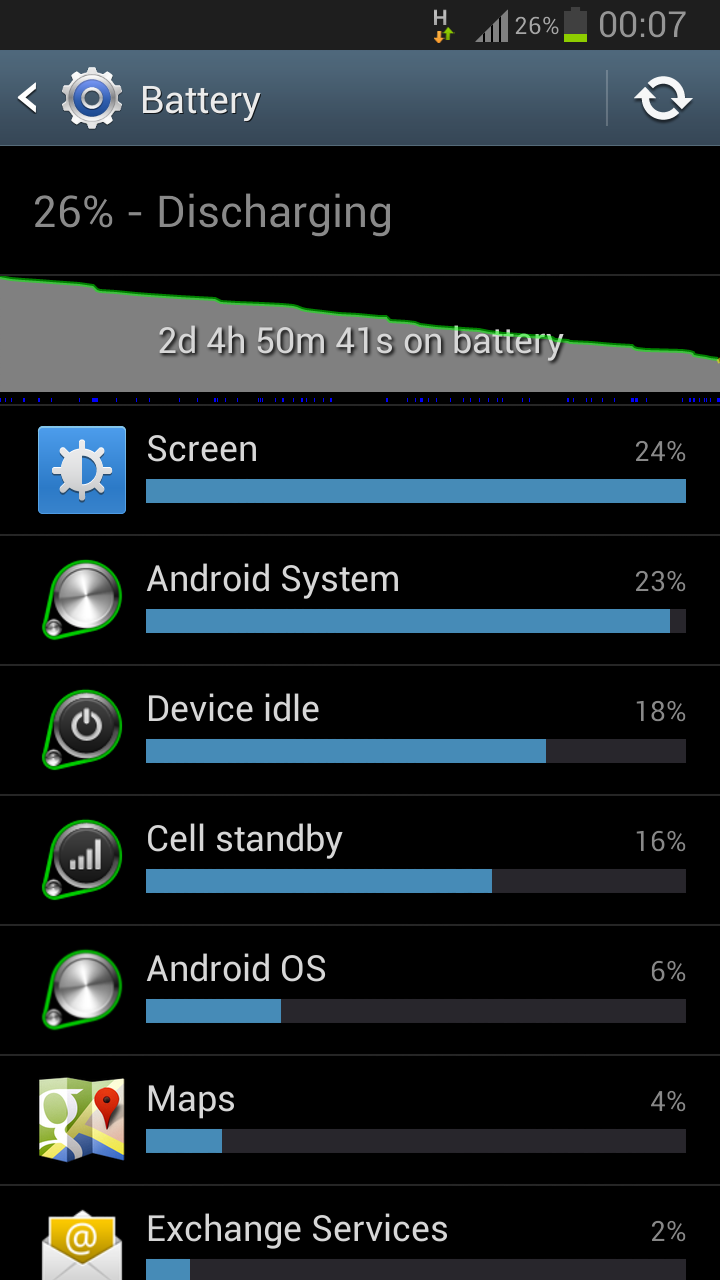
Finally some statistics from average battery duration

Finally I had time to transfer my newest photos and screenshots from my i9300 to PC. I should put this to other words, I had a plenty of time but discovered that more than 50 new photos in my cell, which requires sorting and archiving which in my case takes time as being such a perfectionist.

As a reminder my daily use is following (average work day)
  
  • Email (Exchange)
    •  Exchange auto push during rush hours (7.30-16.00) 
    • In every 1 hour during off-peak hours (16.00-22.00)
    • Disabled during night time (22.00-7.30)
  • Email (Gmail)
    • Automatically in every hour 24/7
  • Browsing
    • Average 15-30 minutes daily
  • Facebook
    • Average 15-30 minutes daily
  • Casual calls and messaging

Following two screenshots describes difference between two newest builds of ARHD

ARHD 15.1
ARHD 16.0

When both screenshots were taken, ARHD custom ROM was running stock kernel and without any possible tweaks provided by ROM's AROMA installer.

torstai 6. joulukuuta 2012

Continuing with ARHD

Haven't been active here lately because my daily work routines keeping me quite busy, yeah I know it ain't excuse. Anyway I'm still on Android Revolution HD custom ROM, which is keeping me pleasant.

Newest version 16.0 is based on leaked Sammy 4.1.2 which whoever is running smoothly. Lately Samsung has released official 4.1.2 (JZO54K) FW, more information can be found from here. Haven't checked yet if there's any differences between leaked and official build, whoever developer of ARHD (mike1986.) is going to re-compile ARHD with new official 4.1.2 Sammy.

Some thoughts about currently newest build of ARHD 16.0

Currently running it with newest Perseus custom kernel (alpha27) and I've found quite balanced setup between performance and battery duration. My GS3 is running smoothly with average 45-50 hours battery duration.

Ps. as I get screenshots transferred from my mobile to PC, I'll add here screenshots to prove better battery stats by showing my average level of use.

It's a bit classy to say but anyway stay tuned!

torstai 8. marraskuuta 2012

So satisfied to ARHD custom ROM

Haven't been so active writing here as trying to prove being kinda HC dev person in Android platform. Probably one reason for being passive lately is that nothing much has happened lately.

In other words it's mainly about updating ARHD (Android Revolution HD) to newer possible version as any updated build becomes available in XDA Developers Forum by developer mike1986. Whoever I'd like to point out few comments about newest version 14.0: in overall level newest JB base (4.1.1 in GS3) is pretty smooth and provides remarkable performance without forgetting reasonable battery performance.

In nutshell my daily use is following:

- Browsing 15-30 minutes
- Internet radio or Spotify 30 minutes (+/- 10 minutes)
- Exchange: auto push during rush hour (between 8am and 3pm) and in every 30 minutes otherwise
- Facebook use varies a lot: sometimes 10-15 minutes, but sometimes even one hour

With earlier mentioned average daily use my stock battery lasts around 45-55 hours which I've found out more than acceptable.

More posts in near future so stay tuned!

keskiviikko 17. lokakuuta 2012

Too tired for waiting official JB - time for custom ROM

As already mentioned in earlier post, I'm tired to wait official JB release in Finland, so finally decided to install custom ROM to my GS3.

First I installed newest CWM Touch recovery via Odin. After booting first time to CWM, I did following steps:

1. Full backup via Nandroid
2. Flash SuperWipe (Android_Revolution_HD_Super_Wipe_Galaxy_S3.zip, can be found from opening post with instructions)
3. Install custom ROM ( install zip from sdcard)
4. Install custom kernel (Perseus for JB)

I decided to try newest Android Revolution HD custom ROM, mainly because it's improved and optimized stock ROM based on JB build. Also I prefer AROMA installer which allows to choose wanted options, tweaks and modifications personally instead of "Install-All" choice. In my previous Android (HTC Desire Z) I used newest Andromadus Mimicry custom ROM which also included AROMA installer.

Ps. next post probably includes thoughts about Android Revolution custom ROM's performance, battery duration and relevant matters. As always said, stay tuned!

lauantai 6. lokakuuta 2012

Giving goodbyes for my first Android

As I've been using Galaxy S3 for around a month now, I decided to sell my first Android cell, which was HTC Desire Z. I'm trying to find possible purchaser in Facebook's local "second hand" community and hoping to get rid of it because it lays in one of my bureaus without no meaningful purpose.

I put 180 euro starting price because I wanted to drop out possible discount beggers. Also even Desire Z is not brand new, it's still in very good condition: purchase date was April 18th 2011, screen had screen protector since first use without forgetting of active use of HTC's official accessorize, leather pouch.

When writing this post, my sale advertisement has been online a bit less than 24 hours and already got one possible purchaser. Now just waiting for real contact to proceed purchase process.